
Teaching an AI agent to build my Redash dashboards
I gave a Claude Code skill access to my self-hosted Redash and let it build the ultimate dashboards.
Hey 👋 it’s been a while. I’ve spent the last six months (mis)-prioritizing writing, letting it slide behind everything that felt more urgent (product building) at the time, and I’ve decided to go back to long form. This is me easing back into it with something I actually did last week.
TL;DR: I created a skill to let Claude Code access my self-hosted Redash and let it build the ultimate dashboards. Get it here: https://github.com/smitmartijn/claude-skills
I run a self-hosted Redash for WhatPulse, MuteDeck, and other products. It’s where the numbers live; conversions, signups, the slow accumulation of users that tells me whether anything I’m doing actually works. And like most people with a BI tool, I have a quiet backlog of dashboards I keep meaning to build and never do. Building them by hand is fifteen minutes of clicking I can always do later. So I never do.
Teaching an AI agent to build my Redash dashboards
This time I gave the job to an agent instead. The result was a dashboard I’d been putting off for months. But the interesting part wasn’t the SQL it wrote; it was watching it learn my instance’s quirks and write them down.
A quick word on Redash

If you haven’t run into it: Redash is an open-source business intelligence tool, the kind of thing you point at a database and use to turn SQL into charts and dashboards. You write a query, save it, pick a visualization — a line chart, a counter, a table — and drop those onto a dashboard that refreshes on a schedule. It’s the self-hosted alternative to something like Metabase or Looker, and it’s been my go-to for years precisely because it’s boring in the good way: connect a data source, write SQL, get graphs. The whole thing is also driveable over a REST API, which is the part that matters for this story. It’s pretty dope.
The plan
I wanted a Claude Code skill for Redash, a small bundle of instructions and a helper script the agent reads when the task matches. The pitch was simple: I hand it SQL, it turns that into saved queries, charts, and dashboards on my actual instance, without me touching the UI.
There was an obvious worry going in — maybe Redash doesn’t expose enough through its API to do this at all. It turns out it does. Everything the UI does, the REST API can do too: list data sources, read schemas, create and run queries, create visualizations, assemble dashboards out of widgets. So the skill ended up being two files: a SKILL.md that explains the moving parts, and a small zero-dependency Python wrapper around the API — just urllib from the standard library and a handful of subcommands like create-query, create-viz, add-widget, publish-dashboard. The kind of code an LLM can write in its sleep.
And that’s the thing. The code was never the hard part.
The quirks are the hard part
Here’s what actually happened when the agent first tried to talk to my Redash.
The very first call (just a credentials check) came back 403. The manual curl I’d run a minute earlier worked fine. The difference was a single line buried in the error: error code: 1010. That’s not a Redash error. That’s Cloudflare, sitting in front of my instance, banning the request based on its user agent. Python’s urllib announces itself as Python-urllib/3.x, and Cloudflare’s bot rules drop it on sight. One added header — a normal user agent — and it sailed through.
You won’t find that in the Redash API docs. It’s not a Redash problem. It’s a my-instance problem, and the only way to discover it is to hit my instance.
There were more.
- Asking for a data source’s schema didn’t return a schema. It returned a job — Redash 26 refreshes the schema asynchronously now, so you get a ticket and have to poll for the result. The docs still describe the old synchronous behaviour.
- Fetching a dashboard by its slug, the human-readable bit in the URL, returned a
500 Internal Server Error. Newer Redash wants the numeric ID. You have to list dashboards first to find it. - And the grid. I’d assumed Redash dashboards were six columns wide, because mine mostly are. The one I wanted to add to was twelve. Place a widget assuming the wrong width and it silently overlaps the ones already there.
None of these are interesting individually. They’re the ordinary friction of a real system that has drifted away from its documentation over years of releases. Every self-hosted tool accumulates a layer of this — undocumented behaviour, version-specific gotchas, the fingerprints of whatever’s sitting in front of it.
The agent hit each one, figured out what was actually happening, fixed the wrapper — and then added a line to the skill’s “pitfalls” section so the next run wouldn’t have to relearn it. By the end, SKILL.md had a short, unglamorous list: Cloudflare 1010 means add a user agent. Schema is async, poll it. Fetch dashboards by ID, not slug. Read the grid width off the existing widgets.
That list is the actual product. The Python is replaceable. The list isn’t.
The payoff
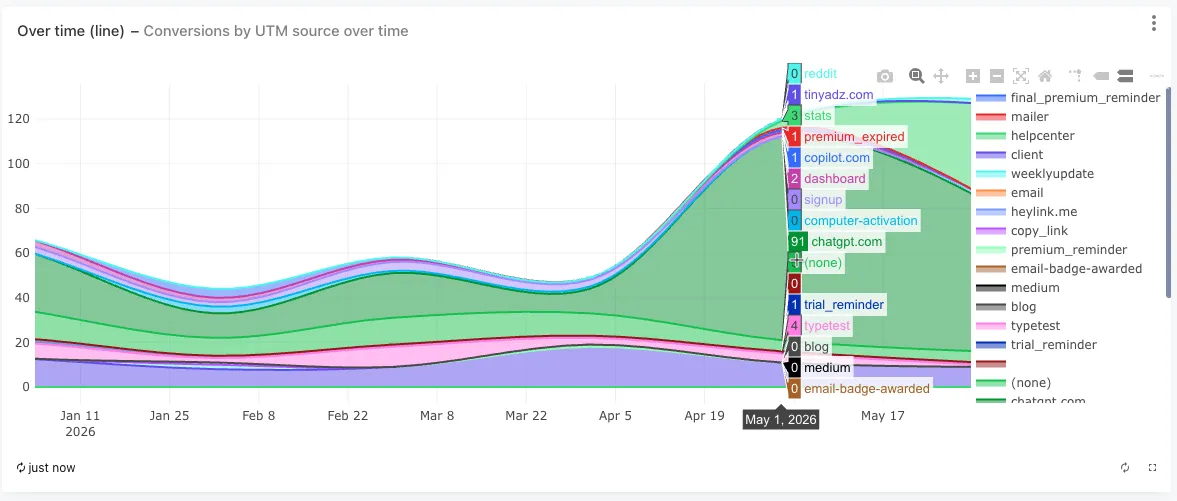
Once it worked, the test was real work. I have a conversions table with a utm_source column, and a question I’d never bothered to answer properly: which sources actually drive signups, and how has that shifted over time?
I described it in a sentence. The agent read the table’s schema, validated a couple of aggregate queries against live data before saving anything, asked me how I wanted the time-series drawn — monthly lines, one per source — and built two charts onto my existing conversions dashboard. Bottom of the page, below what was already there, correctly placed on the twelve-column grid it had learned to check for.
The answer, for the curious: my own client is the biggest source by a distance, and chatgpt.com is now second — people asking ChatGPT and clicking through.
Code is cheap, context is expensive
I’ve stopped thinking of these skills as automation, exactly. They’re more like notes — operational memory I’d otherwise carry in my head and forget, written down in a form an agent can act on. The dashboard was nice. The notes are the point.
If you self-host anything with an API, this is a pattern worth stealing. Don’t write the integration once and throw it away. Give the agent a place to write down what it learned the hard way — and let the next task start from there instead of from the docs.